
Z-BOX: modern megoldás a csomagok biztonságos átvételéhez

Mi az a Z-BOX?
Nonstop működésű csomagautomata
Gyorsan, sorban állás nélkül átvehető megrendelések
Érintésmentes átvétel és csomagfeladás
A Z-BOX környezetbarát
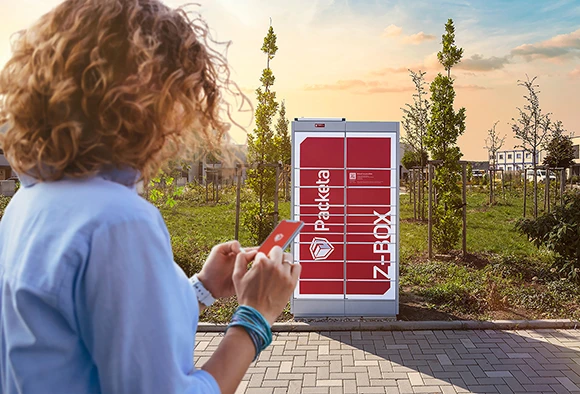
A Z-BOX egy önkiszolgáló átvételi és feladási hely, amelynek köszönhetően már sosem kell otthon ülnöd a futár hívását várva. A küldeményt átveheted a Packeta mobilalkalmazásán keresztül, akkor, amikor időd engedi, és a kiszállítás ára ugyanannyi, mint az üzleti átvételi pontok esetében.
- Könnyű csomagkövetés
- Szinte az összes Z-BOX rendelkeztésre áll a nap 24 órájában, a hét minden napján. Ugorj be például az esti órákban!
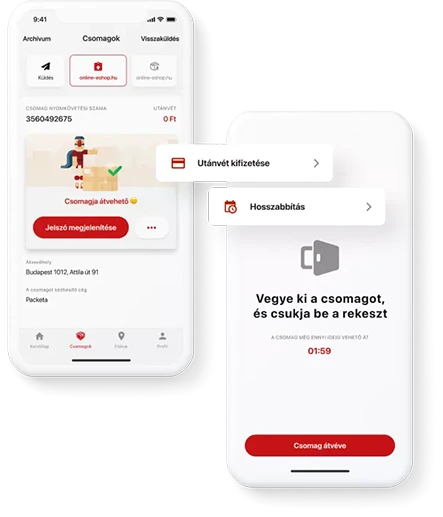
- Átvennéd a csomagodat? Elég használnod az alkalmazást és már a kezedben is tarthatod! A kiszállítás és az utánvét árát online fizetheted ki.
- A Z-BOX érintésmentesen nyílik, alkalmazás segítségével. Nincs több kijelző-tapogatás és érthetetlen gombok!
- A Z-BOXok nagy része minimális elektromos energiát használ, és napelemes panelekkel működik.
A Z-BOX kinyitásához elegendő a Packeta alkalmazás
- Amint megérkezel a Z-BOXhoz, az alkalmazás automatikusan ráacsatlakozik a megrendelésedet tartalmazó fiókra.
- A küldemény részletei között található gombbal a fiókot kinyithatod.
- Ezután már csak elég átvenned a megrendelést és bezárni a fiókot.
Adj fel csomagot a Z-BOX segítségével
1
A Z-BOX nem csak a csomagok kézbesítésében, hanem most már a feladásukban is a rendelkezésedre áll. Add fel csomagodat bárkinek Csehországban, Szlovákiában vagy Magyarországon, akár az éjszaka közepén is. A Z-BOX soha nem zár be!
2
Hogyan küldhetsz csomagot a Z-BOX-on keresztül? Gyorsan és egyszerűen. Add fel a csomagodat a Packeta alkalmazáson keresztül, írd rá a küldeményre a küldési jelszót, tedd be a Z-BOX postaládába és kész!
3
Amennyiben a Packeta alkalmazásban még nem látod a Z-BOX-on keresztül történő küldeményküldés lehetőségét, frissítsd az alkalmazást a legújabb verzióra.
Gyakran Ismételt Kérdések
Szeretnéd, ha lenne egy Z-BOX a környékeden?
Az ideális megoldás az, ha közvetlenül az önkormányzathoz vagy a helységhez fordulsz, akik tudatják velük, hogy érdeklődsz a Z-BOX iránt. A képviselők ezután felmérhetik a többi polgár érdeklődését, vagy megvitathatják az ügyet a tanáccsal, majd közvetlenül kapcsolatba léphetnek velünk az űrlapunkon keresztül.
Képviselő vagyok, és Z-BOX-ot szeretnék felállítani a településemen.
Kérjük, hogy töltsd ki ezt az űrlapot, hogy tudasd velünk, hogy érdeklődsz egy Z-BOX iránt a térségedben. Kérjük, hogy fotókat is mellékelj a Z-BOX számára választott helyről. Az adatokat továbbítjuk értékesítési munkatársunknak, aki rövidesen felveszi Veled a kapcsolatot.
Hogyan tudok átvenni egy csomagot a Z-BOX-ból?
Ahhoz, hogy a Z-BOX kinyíljon, megfelelően be kell állítani a telefont és ki kell fizetni az utánvétet. Hogyan?
- A Packeta legfrissebb verzióját szükséges telepíteni.
- Amikor megérkezel a Z-BOX-hoz, kapcsold be a Bluetooth funkciót a mobileszközödön.
- Győződj meg róla, hogy a mobiladat-kapcsolat be van kapcsolva.
- Amikor csomagot veszel át a Z-BOX-ból, akkor a Z-BOX-tól legfeljebb 2 méter távolságban kell tartózkodnod.
- A küldemény címzettjének regisztráltnak és bejelentkezettnek kell lennie az alkalmazásban.
- Utánvételes küldeményt kaptál a Z-BOX-nál? Akkor először ki kell fizetned az összeget a Packeta mobilalkalmazáson keresztül az online fizetési kapu segítségével. Egyszerűen kattints az alkalmazásban az "Utánvétes fizetés" gombra.
Hogyan vehetek át egy küldeményt a Z-BOX-tól mobiladat-kapcsolat nélkül?
Nincs mobil-interneted? Nem probléma. Küldeményedet már előre elkészítheted az alkalmazásban - Wi-Fi-vel összekötve, otthonod nyugalmában.
- Keresd meg a csomagokat a Packeta alkalmazásban.
- Ha a csomag utánvétes, fizesd ki az alkalmazásban.
- Frissítsd a csomagot (az oldal újratöltéséhez húzd végig az ujjad a képernyőn). Ez letölti az átvételhez szükséges adatokat.
- Most már elindulhatsz a Z-BOX felé.
- Kattints a csomagok adatai között a "Fiók kinyitása" gombra.
- A fiók kinyílik, és át tudod venni a csomagot.
Hogyan történik az utánvét kifizetése? Fizethetek banki átutalással?
Az egyenleg banki átutalással történő kifizetésére nincs lehetőség. Az utánvét kifizetésének egyetlen lehetséges módja az online fizetési kapun keresztül történő fizetés.
- Az alkalmazásban keresd ki az átvételre váró csomagot.
- Kattints a "Utánvét kifizetése" gombra.
- Átirányítunk egy biztonságos fizetési kapuhoz, ahol kitöltheted a kártyaadataidat.
- Győződj meg róla, hogy engedélyezted az online fizetést a kártyádon, és elegendő limitet állítottál be az online fizetésekhez.
Mit tegyek, ha a két nap nem elegendő a csomagom átvételére?
Két naptári nap áll rendelkezésedre, hogy átvedd a csomagodat a Z-BOX-ból. A Z-BOX-ok a nap 24 órájában, a hét minden napján állnak rendelkezésedre - így akár éjszaka is átveheted a csomagodat. Ha mégsem tudod átvenni a küldeményedet, van egy jó hírünk a számodra: egy nappal meghosszabbítható a határidő - így összesen 3 naptári napod van az átvételre.
Csomagod megőrzési idejét a Z-BOX-ban többféleképpen is meghosszabbíthatod:
- A Packeta mobilalkalmazásban: csak keresd ki a csomagodat, és kattints a "Fiók kinyitása" gomb melletti három pontra. Ekkor megnyílik egy lehetőség a "Hosszabbítás" gombbal.
- A Csomagkövetési funkció segítségével, az interneten - ezen a linken.
- Telefonon a +36 1 400 88 06-os számon.
Felhívjuk figyelmedet, hogy a csomag megőrzési ideje csak akkor hosszabbítható meg, ha a csomag "Átvételre kész" státuszban van.
Ha nem sikerül átvenned a csomagot, azt automatikusan visszaküldjük a feladónak - ekkor meg kell állapodnod a feladóval az új küldeménnyel kapcsolatban.
Hogyan vehetem át a csomagot okostelefon nélkül?
Ahhoz, hogy csomagot tudj átvenni a Z-BOX-tól, olyan mobileszközzel (telefon, tablet) kell rendelkezned, amely rendelkezik a Packeta alkalmazás aktuális verziójával, amelyet az App Store-ból vagy a Google Play áruházból tölthetsz le.
Ha nem rendelkezel ilyen eszközzel, kérjük, lépj velünk kapcsolatba a +36 1 400 88 06-os telefonszámon - szívesen segítünk a megoldás megtalálásában. Kérjük, hogy tartsd magadnál a csomagkövetési számot.
Valaki más is átveheti nekem a csomagot?
Nincs akadálya, amennyiben megosztod az adott személlyel a csomagot.
- Kattints a három pontra a megosztani kívánt csomag mellett.
- Megjelenik a küldemény megosztásának lehetősége.
- Válaszd ki a címzettet - vagyis azt a személyt, akivel meg szeretnéd osztani a csomagot - és válaszd ki, hogy hogyan szeretnéd elküldeni neki a csomag adatait (pl. WhatsApp, SMS, AirDrop, e-mail...).
- A kiválasztott személlyel megosztod a küldemény csomagkövetési számát és jelszavát is.
Z-BOX-on keresztül szeretnék küldeményt küldeni
A Z-BOX nem csak a csomagok kézbesítésében, hanem most már a feladásukban is áll rendelkezésedre. Gyors és egyszerű. A Packeta alkalmazáson keresztül megadod az adatokat, kifizeted a szállítás díját, ráírod a csomagra a feladáshoz szükséges jelszót, a csomagot behelyezed egy Z-BOX fiókba és kész is! A videóútmutatóban, vagy a részletes szöveges útmutatóban megtekintheted, hogyan is kell ezt csinálni.
Mekkora csomag fér el a Z-BOXban?
A Z-BOX-ba legfeljebb 5 kg súlyú csomagot lehet kézbesíteni. A rekeszek többféle méretben állnak rendelkezésre - a rekeszbe helyezhető csomag maximális mérete pedig 45 x 36 x 61 cm.
Ha olyan küldeményt rendeltél a webáruházból, amely egyértelműen meghaladja a webáruház paraméterei alapján megadott méreteket és súlyt, rendszerünk nem fogja megjeleníteni a Z-BOXokat a leadási pont kiválasztásakor. Ha nem kapjuk meg a méretadatokat a webáruházból, és a küldemény meghaladja a megadott paramétereket, akkor az általad kiválasztott Z-BOX közelében található átvételi pontra (irodahelyiség, bolt, stb.) fogjuk kézbesíteni.