
Reviews Thrustmaster T-FLIGHT HOTAS 4
Interested in reviews of Thrustmaster T-FLIGHT HOTAS 4? It got 4.5 out of 5 stars from our customers. Find specific customer reviews of Thrustmaster T-FLIGHT HOTAS 4 below. We will appreciate if you also share your experiences with Thrustmaster T-FLIGHT HOTAS 4 after purchasing.
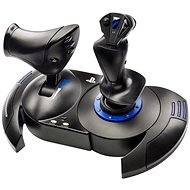
Thrustmaster T-FLIGHT HOTAS 4
Discontinued

David, Karviná Nové Město
Rated 10/06/2025, variant Thrustmaster T-FLIGHT HOTAS 4
Verified purchase
Haven't had it for the longest time, but tried it out on Elite Dangerous, War Thunder and World of Warplanes. It sat beautifully on my desk and doesn't fall, slip or wobble. The cable between the thruster and paddle is about 50cm which I think is adequate (I use personally but attached together). There is an inbus under the paddle so that you can attach the two parts firmly together. I didn't feel any response. AN IMPORTANT NOTE: It is necessary to download the drivers otherwise the thruster will not run and the paddle will have extreme response, this in the manual on the alza was nowhere According to the Internet one of the most quality to the price of 3k-3.5k. The price is low just because of the celloplast. Thruster has a sort of "stop sign" in the middle to reset the speed. In games like Elite Dangerous it's needed and it's great that it's there. There is an eight-way joint on the paddle, so it's just right for looking around.
It holds up frothily
Fits beautifully in the hand
No response
Works beautifully with World of Warplanes, War Thunder and Elite Dangerous
Price
There's an "eight-way knuckle" on the paddle.
Buttons are nicely placed
Plastic

0 ×Report
Automatic translation

KROS spol. s r.o., Kralupy nad Vltavou
Rated 12/02/2025, variant Thrustmaster T-FLIGHT HOTAS 4
Verified purchase
What to add. project wingman slaps, star wars squadrons even automatically without manual setup and No Man Sky using Xbox360 gamepad emulator too: ) Space sims also no problem. Overall satisfaction
+ works fine in all the games I've tested.
plastic, but overall I like the workmanship for the price
the cable between throttle and joystick could definitely be longer
I would have liked some more solid mounting on the table
0 ×Report
Automatic translation
Customer, Ústí nad Labem
Rated 11/01/2025, variant Thrustmaster T-FLIGHT HOTAS 4
Verified purchase
If you don't want to spend a lot of money on a proper joystick and aren't serious about flight sims, this will do.
Price
Better with a joystick like this than without.
It looks like cheap plastic to me.
After installing the current device driver, the ID changed and the joystick was no longer detected in MSFS2024. I had to edit the game files manually.
0 ×Report
Automatic translation
Customer
Rated 20/10/2024, variant Thrustmaster T-FLIGHT HOTAS 4
Verified purchase - review from a price comparison website
Cheap, and I can use the joystick and throttle stick with my ps5 and computer
Looks a bit cheap
0 ×Report
Automatic translation

Vojtěch, Praha 9 - Vinoř
Rated 26/12/2023, variant Thrustmaster T-FLIGHT HOTAS 4
Verified purchase
The joystick itself is ergonomic and fits in the hand. The short cables are a drawback, the connection between the gas and the kniple could be on a connector that could then make an extension cable. You can buy a USB extension cable for the PS5. The price is too high for not having foot pedals added to the Joystick. Just an ill-conceived joystick.
It can be used on both PC and PS5. He's good in that respect. It was worse at the beginning of the setup in Windows 11, but then good. In the simulator itself, you have to play around with button settings and balancing, but nothing too complicated. I still recommend it, but not the price, which is greatly inflated.
The cable to connect to the "throttle lever" and the "kniple" is short and hardwired, which bothers a lot. It could be 40 - 50 cm longer, as well as the USB cable to PS5 and PC.
Unnecessarily high price
0 ×Report
Automatic translation
Tomáš, Praha 9
Rated 06/11/2022, variant Thrustmaster T-FLIGHT HOTAS 4
Verified purchase
it doesn't work on PC.
works well on PS4
0 ×Report
Automatic translation

Tomáš, Brno
Rated 10/08/2021, variant Thrustmaster T-FLIGHT HOTAS 4
Verified purchase
perfect for MSFS2020
one more analogue axis hidden in the cradle on the throttle lever
enough buttons
price/performance ratio
the main USB cable could be a bit thicker and the connecting cable a bit longer
the throttle lever locks in the middle of the track, but in practice it doesn't matter much
0 ×Report
Automatic translation