
Reviews Logitech MX Master 4, Offwhite
Interested in reviews of Logitech MX Master 4, Offwhite? It got 4.5 out of 5 stars from our customers. Find specific customer reviews of Logitech MX Master 4, Offwhite below. We will appreciate if you also share your experiences with Logitech MX Master 4, Offwhite after purchasing.
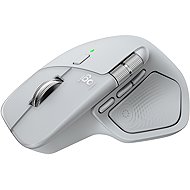
Logitech MX Master 4, Offwhite
In stock > 5 pcs
48,990 Ft
Add to Cart

Richard, Most 1
Rated 13/09/2026, variant Logitech MX Master 4, Offwhite
Verified purchase
Ergonomics (even better than the MX Master 3)
Design
The majority of the rubberised surface is missing
Weight
Silence
Can only be connected via Bluetooth
The side scrollbar could have been designed differently.
It would be good if it were possible to set the side scrollbar as vertical and not just horizontal.
Price
0 ×Report
Automatic translation

Pavel, Prostějov
Rated 20/08/2026, variant Logitech MX Master 4, Offwhite
Verified purchase - review from a price comparison website
it's working so far
0 ×Report
Automatic translation

Anonymous customer
Rated 29/04/2026, variant Logitech MX Master 4, Offwhite
Verified purchase
If you love the ergonomics of the 3S, you won't find it in the 4. Logitech added unnecessary stuff and made what worked worse.
It's a usable mouse, all right.
If you have other peripherals connected via Bolt, this is the logical choice.
After years with the MX Master 3S, the new "four" is a disappointment for me. Overall, Logitech is a bit of a dud, I guess.
Worse grip: The surface is now smoother and slicker. The older model fit like a glove in my hand, the new one feels unsteady and cheap.
Bad ergonomics: Although it looks similar, the shape has been slightly modified and the hand gets tired faster on it. The older 3S was much further along in this regard.
Unnecessary haptic vibrations: It feels like a toy with no real benefit to the job.
More buttons don't mean better: The new buttons on the side hinder rather than help.
Technically no progress: The sensor and response are basically the same. The only weakness of the 3S was the left button, which broke twice on two different copies, and this happens to people very often according to reports. In this respect, only time will tell how the MX4 fares.

0 ×Report
Automatic translation

Customer, Praha
Rated 11/03/2026, variant Logitech MX Master 4, Offwhite
Verified purchase
I have had a Logitech Master 2S for many years, it works but I was curious about this model. I am simply delighted. No noise, nothing, just some gentle vibrations if you want it, if not, totally quiet. I am so glad I upgraded, and thanks to Alza, I tried a few other mice but they weren't worth it. This one certainly is, I can recommend with no hesitation, it's worth the price.
Quiet as a mouse
elegant feel
Everything feels first class
Lots to modify if you like
Great move up from my old Master 2S Logitech mouse
Moves as easy as silk
Nothing at all
0 ×Report
Matěj, Chodov
Rated 07/01/2026, variant Logitech MX Master 4, Offwhite
Verified purchase
I tried upgrading from MX3. Unfortunately, Logitech decided to abandon the rubber surface, which degraded over time, but was nevertheless excellent to the touch. The new plastic surface was unusable for me, as soon as I moved the mouse I could feel it slipping out of my hand. The mouse was brand new. In addition, I couldn't even try the new features because Logi Options+ wouldn't start even after several reinstalls.
robust
extremely slippery from the hand
Logi Options+ has decided not to work, so I can't even set more
0 ×Report
Automatic translation
David, Praha
Rated 05/10/2025, variant Logitech MX Master 4, Offwhite
Verified purchase
The old mx3 was already falling apart, mainly thanks to its intelligent surface. But I'm really pleasantly surprised how well the mx4 works for me. I love the muffling sound of the buttons the most, I didn't know what a miracle it would make after a whole day of work. The haptics are cool and nice but I don't give a shit. It works only in the radial menu and the menu has so far only a small program support, especially Adobe. Obviously, there is no support in the programs I work in like adobe sampler and substance painter. I think I can dream about Maya or Zbrush. That's probably too much rocket engineering and wouldn't be for the masses. Otherwise the mouse is a bomb and I give 5 stars anyway. The best cape on the market.
Ergonomics
The surface of the mouse is finally not rubbery, it has become etched over time
the muffled sound of the buttons is priceless
The Mx series have always been the best mice on the market, this iteration completes them.
Radial menu
Little program support for radial menu, haptics and menu thanks to this I don't use much
0 ×Report
Automatic translation
Jiří, Jindřichův Hradec
Rated 04/10/2025, variant Logitech MX Master 4, Offwhite
Verified purchase
I've been using MX Master 3 for almost 2,5 years with all satisfaction so I quite considered buying Master XM 4, I told myself to make myself happy and so I bought it. First impressions amazing finally a mouse that glides easily clicks softly and accomplishes everything it should. The only thing I recommend is to completely uninstall the old logitech software and install a clean new installation. The upgrade is worth it.
There's nothing I'd mention and the price is acceptable for a happy retiree like me
0 ×Report
Automatic translation

Petr, Praha
Rated 14/10/2026, variant Logitech MX Master 4, Graphite
Verified purchase
The best work mouse on the market
Extremely quiet
Fits perfectly in the hand
Nothing
0 ×Report
Automatic translation
Anonymous customer
Rated 21/09/2026, variant Logitech MX Master 4, Graphite
Verified purchase
I've had all versions of the MX, but the ergonomics of the MX 4 don't suit me at all.
Nice build quality, quiet and precise switches, the best scroll wheel with a freewheel.
Compared to the 3S, it has a different shape and ergonomics. The index finger rests in an unnatural position, and it's harder to grip when moving it on the mouse mat. 150g is too much for all-day use.
0 ×Report
Automatic translation
Antonín, Chrudim
Rated 16/09/2026, variant Logitech MX Master 4, Graphite
Verified purchase
See other customers' positives, e.g. the beautiful free-scroll wheel, lots of buttons with configuration options, quiet.
You can't use the Logitech Onboard Memory Manager software, you have to install Logi Options+
The polling rate is only 125Hz. Although it's not a gaming mouse, it's a bit strange to put such a slow sensor in a mouse of this calibre - the cursor therefore stutters when used with a 144Hz+ monitor and it's not pleasant to play with - it's not a gaming mouse!
0 ×Report
Automatic translation