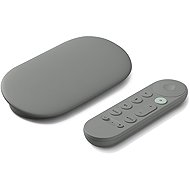
Interested in reviews of Google TV Streamer 4K Hazel - without adapter? It got 4.5 out of 5 stars from our customers. Find specific customer reviews of Google TV Streamer 4K Hazel - without adapter below. We will appreciate if you also share your experiences with Google TV Streamer 4K Hazel - without adapter after purchasing.
Rated 04/08/2026, variant Google TV Streamer 4K Hazel - without adapter
Verified purchase
It turned our older Sony BRAVIA with Linux into a new and modern TV with Google TV. Thanks to HDMI-CEC, we've put the old Sony BRAVIA remote away in a cupboard and now use the Google TV remote directly.
All the apps work. Magenta TV, YouTube, Netflix, Steam Link, Nvidia GeForce NOW. If you need AirPlay, you just need to download AirScreen and you're sorted. The remote is different from classic remotes like the ones Samsung has, for example, but it's just a matter of getting used to it.
The need for a Google account is probably fine, because you'd have to sign in anyway if you want to use Google Play.
speed
option to switch the TV on/off and change the volume (HDMI-CEC)
A cheaper alternative to Apple TV
the openness of Android
The only downside is that you need a Google account.
0 ×Report
Automatic translation
Company
Rated 17/06/2026, variant Google TV Streamer 4K Hazel - without adapter
Verified purchase
I'm disappointed. I’m not looking for cheap devices, so Google products have always represented a compromise between higher quality and price. However, this product marks Google’s first step towards integrating cross-technology functionality. Compatibility has been deliberately removed, and the product forces you to buy a mobile phone, Chromebook and other devices from Google in order to continue using its features. So, following in Apple’s footsteps… But Google will never be Apple. I returned the product, much to my disappointment.
It will replace the smart TV
It supports Google apps; you can install O2TV, MagentaTV and others.
The remote control’s search function is useful for those who are a bit messy.
You can set up your mobile as a remote control, giving you a wireless keyboard for your device via your mobile.
It no longer supports native screen mirroring from the device (you cannot cast content to the screen – for example, a YouTube video you’re watching on your mobile, which older versions could do – and you cannot mirror the screen, with the exception of the Google browser); by supporting only Chromecast technology, this reduces the device’s usability to a minimum.
The price does not reflect the features
On Google Home, you cannot add it as an additional speaker in your home network, something that older versions were able to do.
0 ×Report
Automatic translation
Lukáš, Kladno
Rated 05/05/2026, variant Google TV Streamer 4K Hazel - without adapter
Verified purchase
Bought to Panasonic TV (16 years old plasma which I am not going to give up 😁). After connecting nothing happened, only after changing several chargers and several attempts to turn on the Google TV streamer started (note that the charger is not included! It needs to be purchased. I took in the action for 98 kč at googlTv alza charger 2.1A x5V = 10W) In the package is only cable usbA - usbC. That's the one he's finally running on and hopefully we'll see. After starting it, it wanted to configure everything via mobile and Google Home. Unfortunately, it didn't work. Then came the classic setup via the controller. Manually fill in your Google account, password, etc. and everything was up and running then WiFi connect password. and yay. Then everything was running like clockwork. All apps watchTv, Oneplay, vidafoneTV, Disney, HBO, Netflix, YouTube, soundCloud, Spotify... all installed and linking via mobile and mostly just QR code. so it's a blast. The last thing that bothered me was the volume control on the Google TV remote. At first it didn't work well, but after changing the settings it ran without any problems. Because my 16 yr old controller has had a bit of a run around, especially the volume buttons 🤣. The only problem is a little volume range in Google TV. it only has 15x points ( you can press the volume 15 times = silence 15 = maximum) but my Panasonic has 60 points. So the volume jumps up and down faster and it's not as subtle. ( for example if you put on googlTV 5x it is like before 20, if 16x so 24. if 17x so 28) The only thing I have not managed to decide is turning off and on the TV via the Google TV driver unfortunately. So I have to manually turn on the TV and set the input to HDMI where the streamer is. But then everything runs perfectly. The system is very fast and snappy, I would even say faster than the integrated software in some smart tvs (we compared Samsung and Sony) So in my opinion for 3k a very decent piece of hardware to an old tv absolutely ideal if someone does not want to throw it away. All you need is an HDMi connector and a charger socket. Handy button on the back to locate the remote which then beeps ( classic somewhere sunk in the couch 🤣) So so far great satisfaction. We'll see if it lasts and we don't get a claim somehow. Oh, and of course, you can set up multiple Google accounts on Streamer so that it can be assigned to each member of the household. I didn't want my account as the main one so we headed to a new family account on google and we got that as the main one. For others, it doesn't show advertising and viewing history on the platforms according to what I have on my mobile, but it's a clean profile only on TV. Of course, if I put mine on, then yes. So, privacy-wise, I think it's great. Of course, it mirrors the mobile and so do the apps. We chose the darker version and it is elegant on dark wood (tigerwood) not like the white one. Unfortunately, the driver is not so easy to see especially in the evening. And the buttons and everything except one button is monotonous and grey. No paint! So at the beginning we had to watch what I press not so boring. but elegant and intuitive, we got used to it right away. It has preset buttons for YouTube and Netflix and one with an asterisk for anything ( I watch TV there) and that's about it. For me I can only recommend it and so far maximum satisfaction. Price matches quality + support and updates.
Fast and agile software
easy operation and intuitive control
TV volume control ( only due to HDMI connection nothing more )
just HDMI + charger in the socket and WiFi and the old TV is a media center ( cottage / vacation )
price performance + possible support
the ability to mirror your mobile phone
possibility of multiple profiles of household members ( other Google accounts)
32GB internal memory
elegant gray color on a dark menu so does not shine as white
button to find the driver which then beeps
after switching it on, it didn't want to respond until after several attempts
the charger is not included (although I think there is a dedicated space for it in the box) the cable is
more complicated initial communication with Google Home ended in failure (but may just be my case)
a monotonous grey controller with no colours. nothing but grey ( well one button is white and that's Home return to main screen )
HDMI must be purchased (not included)
0 ×Report
Automatic translation
Radek, Kutná Hora
Rated 14/03/2026, variant Google TV Streamer 4K Hazel - without adapter
Verified purchase - review from a price comparison website
Speed
0 ×Report
Automatic translation
Petr, Jesenice u Prahy
Rated 24/02/2026, variant Google TV Streamer 4K Hazel - without adapter
Verified purchase
Purchased for Samsung S95F TV as a replacement for the built-in apps. The picture is subjectively much nicer and sharper than when using apps installed directly on the TV. For me, a big connection
System speed
HDMI 2.1
4K support
0 ×Report
Automatic translation
Lucie, Praha 5
Rated 29/07/2026, variant Google TV Streamer 4K Porcelain - without adapter
Verified purchase
A great bit of kit if your TV is fine and it's just the interface and perhaps the limited availability of apps that are bothering you. Saves a lot of money.
It can be hidden neatly behind the TV, so you don't even know you have anything new connected to it. It picks up the signal from the remote beautifully.
Also allows you to connect headphones via BT - you'll appreciate it when the baby's sleeping.
0 ×Report
Automatic translation
Martin, Praha 9 - Běchovice
Rated 22/07/2026, variant Google TV Streamer 4K Porcelain - without adapter
Verified purchase
Excellent speed and responsiveness. I use the usual ones: Netflix, YouTube, Vodafone TV, Prima + and iVysílání. I recommend Projectivy Launcher. Compared to the Homatics Box R 4K PLUS, the difference is absolutely massive. The Homatics Box R 4K PLUS is now only available from CoreElec – it really excels with KODI.
Speed
Feedback
I recommend Projectivy Launcher
The remote control doesn’t have any buttons for changing channels; I’m using the remote control that came with the Homatics Box R 4K PLUS
I bought it on Alza for 2,700 Kč; today’s price is outrageous.
0 ×Report
Automatic translation
Roman, Ostrava - Hrabůvka
Rated 02/06/2026, variant Google TV Streamer 4K Porcelain - without adapter
Verified purchase - review from a price comparison website
I recommend
I've always used Android boxes from Ali. This one is the fastest anyway, I mainly wanted something that would run Vodafone TV.
Lack of USB input
0 ×Report
Automatic translation
Jan, Kunětice
Rated 04/05/2026, variant Google TV Streamer 4K Porcelain - without adapter
Verified purchase
Great satisfaction. Everything works great. First setup via Google Home on the left, but remote right in the device totally fine. So satisfaction and I can recommend.
0 ×Report
Automatic translation
František, Kuřim
Rated 26/04/2026, variant Google TV Streamer 4K Porcelain - without adapter
Verified purchase
A TV that has a slower system but a great picture will make a new TV again.
System speed
Simplicity
Profiles for children
Decent design
I'm missing the buttons on the remote to switch programs
0 ×Report
Automatic translation
Try our cookies
Alza.cz a. s., Company identification number 27082440, use cookies and other data to ensure the proper functioning of the website and, with your consent, also, among other things, to personalize advertising and the content of our websites. By clicking on the “I understand“ button, you agree to the use of cookies and the transfer of data regarding the behavior on the website for displaying targeted advertising on social networks and advertising networks on other websites.