
Reviews ASUS WT425 Blue
Interested in reviews of ASUS WT425 Blue? It got 4.6 out of 5 stars from our customers. Find specific customer reviews of ASUS WT425 Blue below. We will appreciate if you also share your experiences with ASUS WT425 Blue after purchasing.
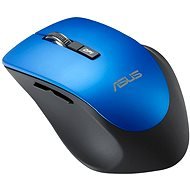
ASUS WT425 Blue
In stock 1 pcs
6,490 Ft
Add to Cart

Anonymous customer
Rated 29/03/2026, variant ASUS WT425 Blue
Verified purchase
After about half a year the scroll wheel has completely gone, and it works more or less randomly. He randomly jumps up and down when scrolling, but definitely not the way he scrolls. The microswitch on the left button is also going away. It's virtually impossible to do a double-click. Now the product is under complaint and we will see how ASUS will deal with it. I assume a piece-for-piece replacement, because I haven't seen them repairing micro switches anywhere
very quiet
microswitches and scroll wheel going away
0 ×Report
Automatic translation

Karel, Praha 4 - Točná
Rated 11/03/2019, variant ASUS WT425 Blue
Verified purchase
1xAA battery
Beautifully in the hand, even the larger many buttons, the main two are very quiet.
It' s not Leaser
0 ×Report
Automatic translation

Customer, Praha 3
Rated 10/07/2018, variant ASUS WT425 Blue
Verified purchase
Really quiet (wheel is a bit worse)
Automatic shutdown when the laptop goes into sleep mode (and probably shuts it down).
Pleasant matte finish on the left side (thumb)
Ergonomically, it almost fits in my hand personally (see negatives)
Switch off button
I' m slowly getting used to it after 2 weeks, but the right side is ergonomically illogically designed (my little finger hits the edge)
In addition, the matte finish is not all over the side, but instead a glossy finish (worse, personally more unpleasant but I' ll get used to it)
As I already wrote - the wheel is not as quiet as the buttons, but so far the quietest I' ve had
0 ×Report
Automatic translation
Techservice CZ, s.r.o., Brno 39
Rated 25/06/2018, variant ASUS WT425 Blue
Verified purchase
very quiet - buttons inaudible at normal environmental volume, wheel is a little louder (but not more than other similar mice)
well-accessible buttons above the thumb, which at the same time do not get in the way
possibility of switching off
maybe it could have been a bit bigger and heavier (I have a big hand 10)
if it had a tilting wheel it would be awesome (and of course more expensive. )
0 ×Report
Automatic translation

Jan, Město Touškov
Rated 29/10/2016, variant ASUS WT425 Blue
Verified purchase
Silence - the only reason why I chose this particular mouse
" Ergonomics" - the area for the right little finger had to be designed somewhere without the right little finger
The area for the right thumb is cut too much inward, it absolutely did not fit in the hand during use
too low and non-ergonomic for my rather large hand (size L).
the side buttons are definitely not silent
if she wasn' t completely silent, which is the only plus, I' d happily give her to my worst enemy. Returned after two days of use.
0 ×Report
Automatic translation
Milan, Stochov
Rated 12/10/2016, variant ASUS WT425 Blue
Verified purchase
Holds well, pretty quiet.
I didn' t find any, it suits me perfectly
0 ×Report
Automatic translation

Libor, Domažlice
Rated 18/09/2016, variant ASUS WT425 Blue
Verified purchase
Works well, no glitches.
It is too ergonomic for me
0 ×Report
Automatic translation
Helena, Sezimovo Ústí
Rated 10/08/2016, variant ASUS WT425 Blue
Verified purchase
Fits in the hand, very quiet
none
0 ×Report
Automatic translation

Jan, Tachov
Rated 23/02/2016, variant ASUS WT425 Blue
Verified purchase
elegant and silent mouse
0 ×Report
Automatic translation
Jiří, Praha, Praha 5 - Smíchov
Rated 19/02/2016, variant ASUS WT425 Blue
Verified purchase
It has silent button operation. If you' re used to this " luxury" (for example, from some Nexus or Speedlink mice), it' s hard to get used to it. This is currently the only mouse in the Alza range that has silent buttons.
Not suitable for a desktop under a table - the wireless transmitter/receiver cannot transmit the signal without problems, the mouse jerks, gets stuck, etc. The distance from the USB transmitter/receiver is approximately 80 cm. I plan to give it one last shot with the help of a USB extension cable
My friend (right-handed) has a very bad hand pain due to its shape (she uses a laptop, the mouse is close to the transmitter and works fine). It didn' t hurt my hand, but I didn' t use it for a long time because of the problems.
If it was a regular noisy mouse, I' d just write it off and give it to someone I don' t like.
Path.
0 ×Report
Automatic translation