
Reviews AlzaPower 2in1 Bi-Directional HDMI 4K/60Hz Switch grey
Interested in reviews of AlzaPower 2in1 Bi-Directional HDMI 4K/60Hz Switch grey? It got 4.4 out of 5 stars from our customers. Find specific customer reviews of AlzaPower 2in1 Bi-Directional HDMI 4K/60Hz Switch grey below. We will appreciate if you also share your experiences with AlzaPower 2in1 Bi-Directional HDMI 4K/60Hz Switch grey after purchasing.
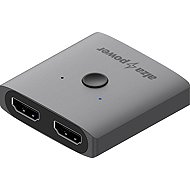
AlzaPower 2in1 Bi-Directional HDMI 4K/60Hz Switch grey
In stock > 10 pcs
4,140 Ft
Add to Cart

Pavel, Litomyšl
Rated 12/09/2026, variant AlzaPower 2in1 Bi-Directional HDMI 4K/60Hz Switch grey
Verified purchase - review from a price comparison website
It's a switch between screens - it doesn't duplicate to both outputs. (but maybe it was described that way in the description)
0 ×Report
Automatic translation

Bohumil, Albrechtičky
Rated 01/09/2026, variant AlzaPower 2in1 Bi-Directional HDMI 4K/60Hz Switch grey
Verified purchase
fajne, jen mi občas vypadaval obraz, asi bych to nechtěl na dlouhodobé používání
0 ×Report

Jiří, Slopné
Rated 24/07/2026, variant AlzaPower 2in1 Bi-Directional HDMI 4K/60Hz Switch grey
Verified purchase - review from a price comparison website
Awesome works
0 ×Report
Automatic translation
Tomáš, Šternberk 1
Rated 17/06/2026, variant AlzaPower 2in1 Bi-Directional HDMI 4K/60Hz Switch grey
Verified purchase
I’ve got my PC and PS5 connected to a single monitor, and it works brilliantly. Even when one device is completely switched off. It is therefore not the case that it must be in standby mode at the very least. It’s easy to switch between them. Total satisfaction.
Really functional
Attractive metal design
A subtle LED
Easy switching
0 ×Report
Automatic translation
Company
Rated 15/06/2026, variant AlzaPower 2in1 Bi-Directional HDMI 4K/60Hz Switch grey
Verified purchase
I'll have to try a different product and return this one
Unfortunately, it didn’t work as it should have – it kept switching power sources, and it wouldn’t connect to the Mac at all; it handled the PlayStation better
0 ×Report
Automatic translation

David, Česká Kamenice
Rated 12/06/2026, variant AlzaPower 2in1 Bi-Directional HDMI 4K/60Hz Switch grey
Verified purchase
It might be OK for FHD, but it’s unusable for 4K
It flickers in 4K. at first, about once every 20 minutes; after the second hour of work, as often as every 5 minutes
0 ×Report
Automatic translation

Ladislav, Dolní Dunajovice
Rated 10/06/2026, variant AlzaPower 2in1 Bi-Directional HDMI 4K/60Hz Switch grey
Verified purchase - review from a price comparison website
Very satisfied with the APW-ADHD2HD01Y 2-in-1 HDMI adapter. OK."
0 ×Report
Automatic translation
Anonymous customer
Rated 31/05/2026, variant AlzaPower 2in1 Bi-Directional HDMI 4K/60Hz Switch grey
Verified purchase
It works
it's a good gadget
0 ×Report
Automatic translation

Milan, Bukovinka
Rated 15/04/2026, variant AlzaPower 2in1 Bi-Directional HDMI 4K/60Hz Switch grey
Verified purchase - review from a price comparison website
Works as it should, no problems.
0 ×Report
Automatic translation
Matěj, Libáň
Rated 14/04/2026, variant AlzaPower 2in1 Bi-Directional HDMI 4K/60Hz Switch grey
Verified purchase
This switch just messed up my second graphics because the 5v pin that is in the hdmi cable backfeeds through the second input (if you use it as a switch for two inputs and one output, which means that the 5v that went through the switch originally from the ps4 to the monitor also went through the second input to my graphics card which then stopped working for the second time and now I don't have a replacement like before. I wouldn't recommend it, but instead of this passive switch which doesn't have a stripped electric current which causes backfeeding and thus caused this damage, I would rather buy a switch which has its own psu or its own power supply and prevent this problem for a slightly higher price than to solve this...
metal body
a cheap way to destroy your components
backfeeding 5V through hdmi cable which caused me damage
Unreliable
has no way to assign to a table or organize in any way and thus creates another mess unless you use a double-sided strap or e.g. assign to a table
requires 3x hdmi cable
0 ×Report
Automatic translation